Introduction
Creating high-quality content is an essential part of building a successful website. However, simply publishing a well-written article does not guarantee that it will be discovered by the right audience through search engines.
Search engines need to understand the purpose, context, and relevance of a webpage before determining how it may appear in search results. At the same time, visitors need to find the information they are looking for quickly and have a positive experience while using the page.
This is where On-Page SEO plays an important role.
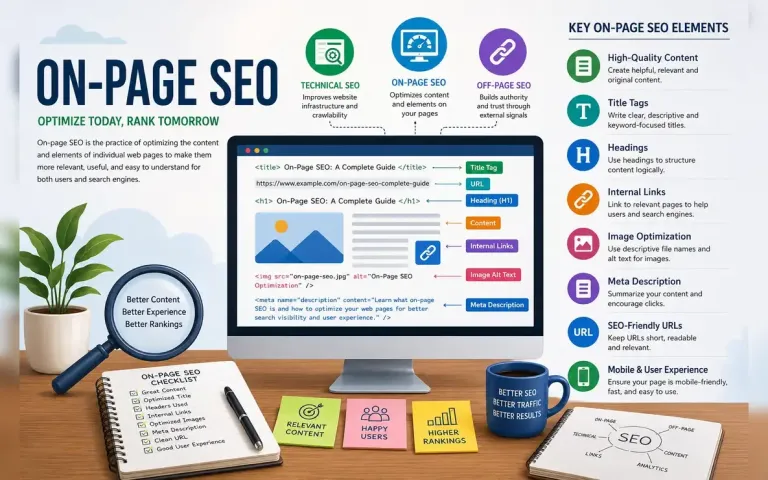
On-page SEO is the practice of optimizing the content and other aspects of individual webpages to make them more relevant, useful, accessible, and understandable to both users and search engines.
For example, if you publish an article about keyword research, the goal of on-page SEO is not simply to repeat the phrase "keyword research" throughout the page. Instead, the page should clearly address the user's search intent, present information in a logical structure, provide relevant and useful content, and make it easy for both visitors and search engines to understand the topic.
On-page SEO is therefore much broader than keyword placement. It is about creating a webpage that effectively serves the needs of its intended audience while providing clear signals about the subject and purpose of the content.
In this guide, we will explore the fundamentals of on-page SEO, understand why it matters, and examine the key practices that can help you create better-optimized webpages and a stronger overall website experience.
What Is On-Page SEO?
On-page SEO, also called on-site SEO, refers to the optimization of individual webpages and their content to improve their relevance, usability, accessibility, and potential visibility in organic search results.
Unlike off-page SEO, which focuses on external signals such as backlinks, on-page SEO primarily involves elements that you can control directly on your own website.
These include:
Content quality
Page titles
Headings
URLs
Internal links
Images
Meta descriptions
HTML elements
Page structure
The primary objective is to create webpages that effectively satisfy the user's search intent while making the content easy for search engines to interpret.
Why Is On-Page SEO Important?
On-page SEO is important because it helps connect your content with the people searching for it.
A well-optimized page can help you:
Improve Content Relevance
Clear content organization makes it easier to communicate the main topic of a page.
Improve User Experience
Well-structured content is easier to read, navigate, and understand.
Help Search Engines Understand Content
Descriptive titles, headings, links, and structured content provide useful context about a webpage.
Increase Organic Visibility
When content effectively satisfies relevant search intent, it may have a better opportunity to appear in organic search results.
Improve Website Navigation
Internal links help visitors discover related pages and explore your website.
On-Page SEO vs Off-Page SEO
On-page and off-page SEO are both important, but they focus on different areas.
| On-Page SEO | Off-Page SEO |
|---|---|
| Optimizes elements on your website | Focuses on signals from outside your website |
| Content quality | Backlinks |
| Titles and headings | Brand mentions |
| URLs | Digital PR |
| Internal links | External references |
| Image optimization | Website reputation |
A successful SEO strategy often combines strong on-page optimization with technical SEO and legitimate off-page promotion. Following points are elements on on-page seo and its strategy:-
1. Create High-Quality, Helpful Content
Content is at the center of on-page SEO.
A page should provide genuine value to its intended audience.
Before publishing, ask:
Does this content answer the user's main question?
Is the information accurate?
Is it original or does it provide a useful perspective?
Is it easy to understand?
Does it cover the topic sufficiently?
Is the content up to date?
For example, if you are writing about keyword research, simply defining the term may not be enough.
A more useful guide could explain:
What keyword research means
Why it matters
Search intent
Long-tail keywords
Keyword research tools
Keyword selection
Common mistakes
Practical examples
The objective should be to provide a useful resource rather than simply produce content for search engines.
2. Understand Search Intent
Search intent refers to the reason behind a user's search.
Understanding intent is one of the most important aspects of on-page SEO.
For example, consider these searches:
What is SEO?
The user probably wants an explanation.
How to improve SEO?
The user wants practical instructions.
Best SEO tools
The user may be comparing different tools.
Buy SEO software
The user may be ready to purchase.
Each query requires a different type of content.
Before creating a page, ask:
What information or action is the user expecting from this search?
Your page should satisfy that expectation.
3. Optimize the Page Title
The title tag is an important HTML element that describes the subject of a webpage.
It can appear as the clickable title in search results and is also displayed in the browser tab.
For example:
On-Page SEO: A Complete Guide to Optimizing Your Web Pages
is a clear title for this article.
A good page title should generally be:
Accurate
Descriptive
Concise
Relevant to the page
Written for users
Avoid misleading titles that promise information the page does not provide.
Example
Weak:
SEO
Better:
On-Page SEO: A Complete Guide to Optimizing Your Web Pages
The second title immediately communicates the subject and purpose of the page.
4. Use a Clear Heading Structure
Headings organize your content into logical sections.
A typical webpage may use:
H1 – Main page title
H2 – Major sections
H3 – Subsections
H4 – Additional subsections, when necessary
For example:
H1: On-Page SEO: A Complete Guide
H2: What Is On-Page SEO?
H2: Why Is On-Page SEO Important?
H2: Important On-Page SEO Factors
H3: Page Titles
H3: Headings
H3: Internal Links
This structure helps users scan long articles and understand how different sections relate to one another.
Use headings to organize content logically rather than simply inserting keywords into every heading.
5. Use Keywords Naturally
Keywords remain useful for communicating the subject of a webpage.
However, SEO is not about repeating a keyword as many times as possible.
For example, if the primary topic is on-page SEO, the page may naturally discuss related concepts such as:
On-site SEO
Page titles
Internal links
Search intent
Content optimization
Heading structure
These terms help provide context.
The goal is to write naturally and comprehensively rather than artificially repeating the same phrase.
6. Write a Strong Introduction
The introduction is one of the first parts users see.
A good introduction should:
Establish the topic.
Explain why it matters.
Tell readers what they will learn.
For example, this article begins by explaining why good content alone may not be sufficient and then introduces on-page SEO as a way to improve webpage relevance and usability.
Avoid lengthy introductions that delay the answer.
Users should quickly understand what the page is about.
7. Optimize Your URL Structure
A clean and descriptive URL helps communicate the subject of a webpage.
For example:
example.com/on-page-seo-complete-guide
is easier to understand than:
example.com/page.php?id=456
A good URL should generally be:
Short
Descriptive
Readable
Relevant
Avoid unnecessary parameters and excessive words when they do not add value.
For your BizInfotech article, a suitable URL could be:
bizinfotech.in/post/on-page-seo-complete-guide
assuming this matches your existing URL structure.
8. Write Useful Meta Descriptions
A meta description provides a short summary of a webpage.
Although meta descriptions are not generally considered a direct ranking factor, they can help users understand what a page offers when it appears in search results.
A good meta description should:
Accurately summarize the page
Clearly communicate its value
Be relevant to the search query
Encourage the right audience to visit
For this article:
Learn what on-page SEO is and how to optimize titles, headings, content, URLs, images, internal links, and other webpage elements to improve search visibility and user experience.
The description accurately reflects the article's content.
9. Optimize Internal Linking
Internal links are links from one page of your website to another page on the same website.
They are important for both users and search engines.
Internal linking can help:
Users discover related content
Search engines discover pages
Establish relationships between topics
Improve website navigation
Create a logical content structure
For example, this article can link to:
How Do Search Engines Work?
Technical SEO
Off-Page SEO
Your digital marketing article can also link to your SEO pillar article.
This creates a connected content ecosystem.
10. Use Descriptive Anchor Text
Anchor text is the clickable text used in a hyperlink.
For example:
Learn more about keyword research.
Here, "keyword research" is the anchor text.
Descriptive anchor text helps users understand what they will find after clicking the link.
Instead of:
Click here
use:
Learn more about keyword research
where appropriate.
The link text should accurately describe the destination page.
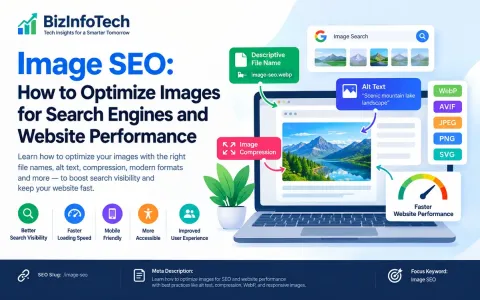
11. Optimize Images
Images can improve the visual quality and usefulness of a webpage.
However, images should be optimized for both users and performance.
Use Descriptive File Names
Instead of:
IMG_12345.jpg
consider:
on-page-seo-guide.webp
Use Alt Text
Alt text helps describe an image's content and can improve accessibility.
For example:
On-page SEO optimization checklist showing page title, headings, internal links, and image optimization
Alt text should describe the image accurately rather than unnecessarily stuffing keywords.
Compress Images
Large image files can increase page loading times.
Use appropriate compression and modern formats such as WebP when suitable.
Use Responsive Images
Images should display correctly across different screen sizes.
12. Improve Content Readability
Good SEO content should be easy to read.
Consider using:
Short paragraphs
Clear headings
Bullet points
Numbered lists
Tables where useful
Bold text for emphasis
Adequate spacing
Avoid presenting large blocks of text without visual breaks.
For example, a 3,000-word article with clear sections is generally easier to navigate than a 3,000-word article presented as a single continuous block.
13. Optimize for Mobile Users
A significant portion of internet traffic comes from mobile devices.
Your webpage should therefore work well on:
Smartphones
Tablets
Laptops
Desktop computers
Check:
Font size
Button size
Navigation
Image scaling
Page layout
Horizontal scrolling
A responsive website provides a better experience for visitors using different devices.
14. Improve Page Speed and Performance
Website performance affects user experience.
Slow pages can cause visitors to leave before the content loads.
Common performance improvements include:
Compressing images
Removing unnecessary scripts
Minifying CSS and JavaScript
Using browser caching
Reducing large file sizes
Improving server response time
Using efficient image formats
Performance optimization should focus on real user experience rather than chasing a perfect score in a single testing tool.
15. Use Structured Data When Appropriate
Structured data is a standardized way of providing information about webpage content to search engines.
Depending on the page type, structured data may describe:
Articles
Products
Events
Organizations
FAQs
Courses
Reviews
When correctly implemented and eligible, structured data may help search engines understand the content and can support enhanced search result features.
However, structured data should accurately represent the visible content of the page.
It should not be used to mislead search engines.
16. Create a Logical Content Structure
A well-organized website should have a clear relationship between its pages.
For example, a digital marketing website might have:
Digital Marketing
→ SEO
→ Keyword Research
→ On-Page SEO
→ Technical SEO
→ Off-Page SEO
→ Content Marketing
→ Social Media Marketing
This structure allows users to move logically between related topics.
It also helps search engines understand the relationships between pages.
17. Use Topic Clusters and Pillar Content
A pillar page provides comprehensive coverage of a broad topic.
Supporting articles then explore specific subtopics in greater depth.
For example:
Pillar Page
The Complete Guide to Digital Marketing
Supporting articles:
What Is SEO?
How Do Search Engines Work?
Keyword Research
On-Page SEO
Technical SEO
Off-Page SEO
Content Marketing
Each article can link to relevant supporting pages and back to the main pillar page.
This creates a structured content network.
For BizInfotech, this approach is particularly useful because your digital marketing and SEO articles can form a dedicated content cluster.
18. Optimize for User Experience
SEO should never be separated from user experience.
Consider:
Is the page easy to navigate?
Can users quickly find the information they need?
Is the content readable?
Are links working?
Are advertisements distracting?
Does the page load efficiently?
Is the design consistent?
A technically optimized page that frustrates visitors is not a successful SEO page.
19. Keep Content Accurate and Updated
Some topics change over time.
This is especially true for:
Technology
SEO
AI
Digital marketing
Government policies
Software
Industry regulations
Review important content periodically.
Update:
Outdated statistics
Broken links
Old screenshots
Incorrect information
Outdated recommendations
However, content should not be changed merely to appear "fresh." Updates should improve accuracy and usefulness.
20. Optimize Existing Content
SEO is not only about publishing new articles.
Existing pages can often be improved.
Review your older content and ask:
Is the information still accurate?
Does it satisfy current search intent?
Can the introduction be improved?
Are there relevant internal links to add?
Are the images optimized?
Are there broken links?
Is the title still accurate?
Are there new developments worth including?
Updating valuable content can be an important part of a long-term SEO strategy.
Common On-Page SEO Mistakes
1. Keyword Stuffing
Repeating the same keyword excessively makes content unnatural.
Focus on useful information instead.
2. Writing for Search Engines Instead of People
Search engines are important, but your readers are the actual audience.
Write content that people can understand and use.
3. Using Misleading Titles
A title should accurately represent the content.
Avoid clickbait that creates expectations the page cannot satisfy.
4. Ignoring Internal Links
High-quality pages can remain isolated if they are not connected to related content.
Use relevant internal links to improve discovery.
5. Publishing Thin Content
A short page is not automatically bad, and a long page is not automatically good.
The appropriate length depends on the topic.
Focus on completeness and usefulness rather than word count.
6. Ignoring Mobile Experience
Always check how your content appears on smartphones.
7. Using Large Unoptimized Images
High-resolution images can negatively affect loading performance if they are unnecessarily large.
8. Forgetting to Update Important Content
Outdated information can reduce trust and usefulness.
Review important pages periodically.
On-Page SEO Checklist
Before publishing a webpage, review the following:
Content
Does the page satisfy search intent?
Is the content useful and original?
Is the information accurate?
Does the page cover the topic sufficiently?
Title and Headings
Is the page title descriptive?
Is there a clear H1?
Are H2 and H3 headings logically organized?
Keywords
Is there a clear primary topic?
Are relevant terms used naturally?
Is keyword stuffing avoided?
URLs
Is the URL short and descriptive?
Does it accurately represent the page?
Internal Links
Are relevant internal links included?
Is anchor text descriptive?
Are important pages connected?
Images
Are images compressed?
Are file names descriptive?
Is appropriate alt text provided?
Are images responsive?
User Experience
Is the page mobile-friendly?
Does it load efficiently?
Is the content easy to read?
Are links working?
Technical Elements
Is the page indexable?
Is the canonical URL correct?
Is structured data used where appropriate?
Practical Example: Optimizing a BizInfotech Article
Suppose you are publishing an article titled:
Keyword Research: A Complete Beginner's Guide
Your on-page SEO could look like this:
URL:
/post/keyword-research-complete-beginners-guide
Title:
Keyword Research: A Complete Beginner's Guide to Finding the Right Keywords for SEO
Primary Topic:
Keyword Research
Related Topics:
Search intent
Long-tail keywords
Keyword difficulty
Search volume
Keyword tools
Keyword clustering
Internal Links:
Digital Marketing Guide
What Is SEO?
How Search Engines Work
Image:
Optimized WebP image with descriptive alt text.
Content Structure:
Introduction
What Is Keyword Research?
Why Keyword Research Matters
Types of Keywords
Search Intent
Keyword Research Tools
How to Choose Keywords
Common Mistakes
Practical Process
Conclusion
FAQs
This example demonstrates how different on-page SEO elements work together.
How to Measure On-Page SEO Performance
After publishing a page, monitor its performance over time.
Useful indicators include:
Organic impressions
Organic clicks
Click-through rate
Average search position
Organic traffic
Engagement
Conversions
Tools such as Google Search Console and analytics platforms can help you understand how users discover and interact with your content.
If a page receives many impressions but few clicks, you may want to review its title and description.
If a page receives traffic but users quickly leave, review the content and user experience.
SEO should therefore be treated as a continuous process of publishing, measuring, analyzing, and improving.
The Relationship Between On-Page, Technical, and Off-Page SEO
A successful SEO strategy usually involves multiple areas working together.
On-Page SEO
Focuses on the content and elements of individual webpages.
Technical SEO
Focuses on the technical foundation that allows search engines to access and understand the website.
Off-Page SEO
Focuses on external signals such as relevant backlinks, brand visibility, and digital reputation.
For example, imagine you publish an excellent article.
If the article has:
Excellent content
Strong on-page optimization
Good technical accessibility
Relevant external references
it has a stronger overall foundation for organic search visibility.
No single SEO technique guarantees rankings, but combining good practices can create a stronger website.
The Future of On-Page SEO
Search technology continues to evolve.
Artificial intelligence and increasingly sophisticated search systems are changing how users discover information.
As search becomes more conversational, on-page SEO is likely to focus increasingly on:
Clear answers
Comprehensive topic coverage
Structured information
First-hand experience
Trustworthy sources
User intent
Content quality
This means that website owners should avoid thinking of SEO as a checklist of technical tricks.
Instead, think of on-page SEO as the process of creating a clear, useful, accessible, and trustworthy webpage.
Conclusion
On-page SEO is one of the fundamental components of search engine optimization.
It involves optimizing the elements of individual webpages so that users can easily understand and use the content while search engines can better interpret its relevance and structure.
Important on-page SEO practices include:
Creating helpful content
Understanding search intent
Optimizing page titles
Using clear headings
Using keywords naturally
Creating descriptive URLs
Writing useful meta descriptions
Building internal links
Optimizing images
Improving readability
Ensuring mobile usability
Improving page performance
Maintaining accurate and updated content
However, effective on-page SEO is not about manipulating search engines.
It is about making your content more useful to the people who are searching for it.
When you combine high-quality content with logical organization, strong internal linking, good technical foundations, and a positive user experience, you create webpages that are better positioned to serve both your audience and search engines.
SEO is a continuous process. After publishing a page, monitor its performance, learn from the data, update the content when necessary, and continue improving the overall experience.
The best on-page SEO strategy is ultimately simple:
Understand what your audience needs, create the best possible content to meet that need, and make the content easy to discover, understand, and navigate.
Related Articles:
What Is SEO? A Complete Guide to Search Engine Optimization for Beginners
How Do Search Engines Work? Crawling, Indexing, and Ranking Explained
Keyword Research: A Complete Beginner's Guide to Finding the Right Keywords for SEO
Off-Page SEO: A Complete Guide to Building Website Authority and Trust
Technical SEO: A Complete Guide to Improving Your Website's Technical Foundation
Frequently Asked Questions
1. What is on-page SEO?
On-page SEO is the process of optimizing individual webpages and their content to improve relevance, usability, and potential visibility in organic search results.
2. What are the most important on-page SEO factors?
Important areas include content quality, search intent, page titles, headings, URLs, internal linking, image optimization, readability, and user experience.
3. Is keyword density important for SEO?
There is no ideal keyword density that guarantees rankings. Focus on using relevant terms naturally while providing comprehensive and useful information.
4. What is the difference between on-page SEO and technical SEO?
On-page SEO focuses primarily on content and webpage elements, while technical SEO focuses on the technical foundation of the website, such as crawling, indexing, performance, and site architecture.
5. How often should I update my content?
There is no universal schedule. Review important content when information changes or when performance data indicates that improvements may be useful.
6. Are meta descriptions a ranking factor?
Meta descriptions are not generally considered a direct Google ranking factor, but they can help communicate the value of a page to users in search results.
7. How important are internal links?
Internal links are valuable for website navigation and can help search engines discover and understand relationships between pages.
8. Should every page have a target keyword?
Every page should have a clear topic and purpose. While keywords can help define that topic, you should prioritize user needs and natural language rather than forcing a keyword onto every page.