Introduction
A page title is one of the first things users see when your webpage appears in search results. It also helps search engines understand what your page is about.
A well-written SEO title tag can improve how clearly your page is understood and can encourage more people to click your result. A poorly written title, on the other hand, may fail to communicate the value of your content even when the page itself is useful.
But writing an effective SEO title is not simply about inserting a keyword into a headline.
You need to understand search intent, relevance, clarity, uniqueness, and click appeal.
In this guide, we will explain what an SEO title tag is, why it matters, how to write effective title tags, common mistakes to avoid, and practical examples you can apply to your own website.
What Is an SEO Title Tag?
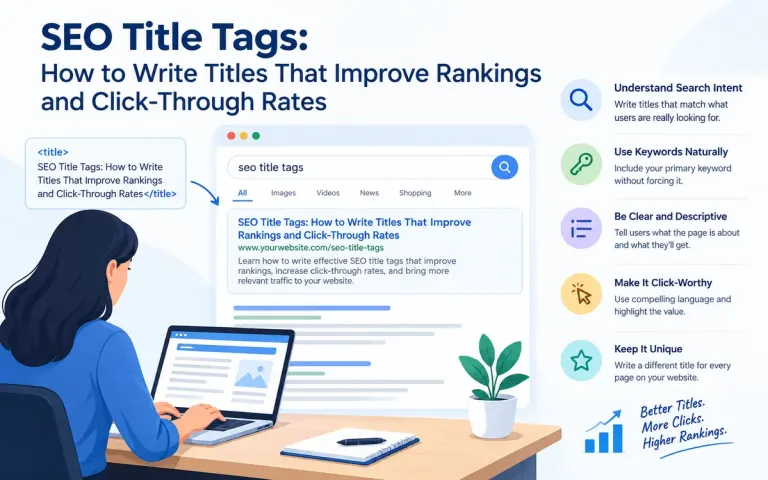
An SEO title tag is the HTML <title> element that defines the title of a webpage.
It generally appears in several places:
As the clickable headline in search engine results
In the browser tab
When a page is bookmarked
In some social and external sharing contexts
A basic HTML title looks like this:
<title>SEO Title Tags: How to Write Better Titles</title>
The title tells both users and search engines what the webpage is about.
For example, if you publish an article about keyword research, a weak title might be:
Keyword Research
A more descriptive title could be:
Keyword Research: A Complete Beginner's Guide to Finding the Right Keywords
The second title provides much more information about the page.
Why Are SEO Title Tags Important?
Title tags are important because they influence both search relevance and user behavior.
1. They Help Search Engines Understand the Page
Search engines use many signals to understand webpage content. The title is an important contextual signal because it summarizes the subject of the page.
A relevant title helps establish what the page is about.
However, the title alone does not determine rankings. Search engines consider many other factors, including content relevance, page quality, links, technical signals, and user experience.
2. They Influence Click-Through Rate
The title is usually one of the most prominent elements of an organic search result.
Consider these two results:
SEO Tips
versus:
10 Practical SEO Tips to Improve Your Website's Search Visibility
The second communicates more clearly what the user can expect.
A useful title can therefore encourage a searcher to choose your result.
3. They Set Expectations
A title creates a promise about what the page contains.
If the title says:
Complete Guide to Local SEO
users expect a comprehensive explanation of local SEO.
If the actual page only contains a short definition, the title creates a mismatch.
Good SEO titles should therefore accurately represent the content.
4. They Improve User Experience
Clear titles make search results easier to understand.
Users should be able to look at a title and quickly determine:
What is this page about?
Does it answer my question?
Is it relevant to my search?
What will I learn or get from clicking?
The clearer the answer, the stronger the reason to click.
SEO Title Tag vs H1 Heading
SEO title tags and H1 headings are related, but they are not exactly the same thing.
| SEO Title Tag | H1 Heading |
|---|---|
| Appears in the browser tab and can appear in search results | Appears as the main heading on the webpage |
| Written in the HTML <title> element | Written using an H1 heading |
| Primarily represents the page in external contexts | Primarily introduces the page content |
| Important for search-result presentation | Important for page structure and user experience |
For example:
Title tag:
SEO Title Tags: How to Write Titles That Improve Rankings and Click-Through Rates
H1:
SEO Title Tags: How to Write Titles That Improve Rankings and Click-Through Rates
They can be identical, but they don't have to be.
In some cases, you may make the title tag more concise for search-result presentation while keeping the H1 slightly more descriptive.
How Long Should an SEO Title Be?
There is no universal character limit that guarantees a title will display completely in search results.
Search engines may truncate or rewrite titles depending on:
Device
Search query
Available display space
Title length
Relevance
Page content
Other search-result factors
Therefore, don't focus on hitting an exact character count.
Instead, prioritize:
Clarity + relevance + concise wording + search intent.
As a practical approach, keep the most important information toward the beginning of the title.
For example:
Technical SEO: A Complete Guide to Improving Your Website
is generally more useful than:
A Complete and Detailed Guide Explaining Everything You Need to Know About Technical SEO for Your Website
The second version is unnecessarily long.
How to Write an Effective SEO Title Tag
Let's look at the most important principles.
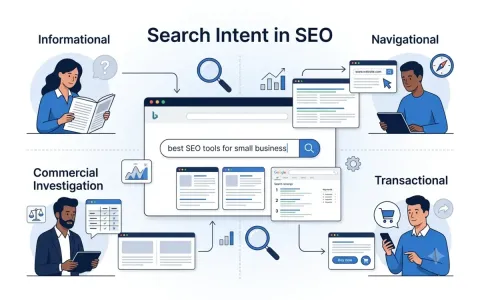
1. Understand Search Intent
Before writing a title, determine what the searcher wants.
This is closely connected with search intent.
For example, someone searching:
how to optimize images for SEO
probably wants a practical guide.
A suitable title might be:
Image SEO: How to Optimize Images for Better Search Performance
Someone searching:
best SEO tools for small business
may be comparing products.
A suitable title could be:
Best SEO Tools for Small Businesses: Features, Uses and Comparison
Your title should reflect the purpose behind the search.
2. Include the Primary Keyword Naturally
Including the primary keyword can help communicate relevance.
For example, if the primary keyword is:
technical SEO
you could write:
Technical SEO: A Complete Guide to Website Optimization
However, don't force keywords into the title.
Avoid:
Technical SEO | Technical SEO Guide | Technical SEO Tips | Technical SEO Strategy
This looks unnatural and provides little value to the user.
Use the keyword naturally and focus on communicating the topic.
3. Put Important Words Near the Beginning
Searchers often scan results quickly.
Compare:
A Complete Guide to Improving Website Performance Using Technical SEO
with:
Technical SEO: A Complete Guide to Improving Website Performance
The second title communicates the topic immediately.
Putting the primary topic toward the beginning can improve clarity.
However, this is a guideline—not an absolute rule.
4. Make the Title Descriptive
A title should tell users what they will find on the page.
Instead of:
Backlinks
consider:
Backlinks in SEO: How to Get High-Quality Links That Matter
Instead of:
Local SEO
consider:
Local SEO: How to Improve Your Business Visibility in Local Search
The descriptive versions provide more context.
5. Communicate a Clear Benefit
Where appropriate, tell users what they will gain.
For example:
SEO Analytics: How to Measure and Improve Search Performance
The benefit is clear: users will learn how to measure and improve SEO performance.
Other useful benefit-oriented phrases include:
How to improve...
Complete guide to...
Step-by-step guide...
Best practices for...
How to choose...
How to fix...
Practical strategies for...
Use them naturally rather than adding them to every title.
6. Match the Content Format to Search Intent
The format of the title can indicate what users will receive.
For informational searches:
What Is Technical SEO? A Beginner's Guide
For how-to searches:
How to Improve Website Speed: A Practical SEO Guide
For comparison searches:
SEO vs PPC: Key Differences, Benefits and When to Use Each
For commercial searches:
Best SEO Tools for Small Businesses: Features and Comparison
For problem-solving searches:
Keyword Cannibalization: What It Is and How to Fix It
The title should accurately reflect the actual content.
7. Make Every Title Unique
Every important page on your website should have a meaningful, distinctive title.
Avoid using the same title for multiple pages.
For example:
SEO Guide
should not be used for five different articles.
Instead:
What Is SEO? A Complete Beginner's Guide
Keyword Research: A Complete Guide
Technical SEO: A Complete Guide
Local SEO: How to Improve Local Search Visibility
SEO Analytics: How to Measure Search Performance
Unique titles help differentiate pages and clarify their individual purposes.
8. Avoid Keyword Stuffing
Keyword stuffing means unnecessarily repeating keywords.
Bad example:
SEO Services | SEO Company | SEO Agency | SEO Expert | SEO Services India
This may look optimized, but it is difficult to read and does not provide a compelling reason to click.
Better:
SEO Services for Small Businesses: Strategies to Improve Search Visibility
The second version is more natural and useful.
9. Use Numbers When They Add Value
Numbers can make certain titles more specific.
Examples:
10 SEO Mistakes That Can Hurt Your Website
7 Practical Keyword Research Strategies
5 Technical SEO Issues You Should Check
12 Ways to Improve Your Website's Search Visibility
Numbers are especially useful for list-based content.
But don't add a number merely because it looks attractive.
If your article contains seven strategies, don't call it "10 strategies."
Accuracy should come first.
10. Use Specificity Instead of Clickbait
Clickbait titles may generate curiosity, but they can also create disappointment if the content doesn't deliver.
For example:
This One SEO Trick Will Make You Rank #1 Overnight
is misleading and unrealistic.
A better title is:
10 Practical SEO Strategies to Improve Your Search Visibility
The second title sets realistic expectations.
Your title should make the page attractive without making false promises.
11. Use Your Brand Name Where Appropriate
For important pages, adding the brand name can help reinforce brand recognition.
For example:
SEO Services for Small Businesses | BizInfoTech
or:
Search Intent in SEO: A Complete Guide | BizInfoTech
However, adding a brand name to every title can make titles unnecessarily long.
For many informational articles, topic clarity should take priority.
12. Consider Your Audience
The best title depends on who you are writing for.
For beginners:
What Is SEO? A Beginner's Guide to Search Engine Optimization
For experienced professionals:
Technical SEO Auditing: Advanced Issues and Optimization Strategies
For small-business owners:
Local SEO for Small Businesses: How to Improve Local Visibility
Your title should use language appropriate for the target audience.
Examples of Weak and Strong SEO Titles
| Weak Title | Better SEO Title |
|---|---|
| SEO | What Is SEO? A Complete Beginner's Guide |
| Keywords | Keyword Research: How to Find the Right Keywords for SEO |
| Backlinks | Backlinks in SEO: How to Build High-Quality Links |
| Local SEO | Local SEO: How to Improve Your Business Visibility |
| AI Marketing | AI in Digital Marketing: Applications, Benefits and Challenges |
| Website Speed | Website Speed Optimization: How to Improve Performance |
| Content Marketing | Content Marketing Strategy: How to Create Content That Performs |
| SEO Analytics | SEO Analytics: How to Measure and Improve Search Performance |
The stronger titles provide context, relevance, and a clearer reason to click.
How to Optimize Title Tags for Click-Through Rate
Click-through rate, or CTR, represents the percentage of users who click a search result after seeing it.
A simplified formula is:
CTR = (Clicks ÷ Impressions) × 100
For example, if your page receives 100 impressions and 5 clicks:
CTR = (5 ÷ 100) × 100 = 5%
Your title is one element that can influence whether someone clicks.
To make your titles more compelling:
Be clear
Tell users what the page is about.
Be specific
Communicate the scope or benefit.
Match intent
Give users what they are actually searching for.
Create curiosity carefully
Encourage interest without misleading users.
Use strong but natural language
For example:
How to Fix Keyword Cannibalization and Improve Your SEO Structure
is more compelling than:
Keyword Cannibalization
Should You Put the Exact Keyword in the Title?
Not necessarily.
Search engines have become much better at understanding language and relationships between concepts.
Your primary keyword can be useful in the title, especially when it naturally fits.
But you don't need to construct titles that sound unnatural simply to include an exact keyword phrase.
For example, suppose your target topic is:
SEO title tag optimization
You could write:
SEO Title Tags: How to Write Better Titles for Search and Users
rather than forcing:
SEO Title Tag Optimization: SEO Title Tag Optimization Guide
The first is clearer and more natural.
Can Search Engines Rewrite Your Title?
Yes.
Search engines may sometimes generate or display a title that differs from the HTML title you specified.
They may do this when they believe another version better represents the page or matches the search query.
Possible reasons include:
The title is unclear
The title is excessively long
The title doesn't accurately describe the content
Important information is missing
The page content provides stronger contextual information
The search query makes another title variation more useful
Therefore, writing a good title tag is important, but you cannot guarantee that search engines will always display it exactly as written.
SEO Title Tags and Search Intent
Title optimization should be connected with your broader SEO strategy.
Consider the following search:
best website builder for small business
The searcher is probably evaluating options.
A title such as:
Best Website Builders for Small Businesses: Features and Comparison
better matches that intent than:
What Is a Website Builder?
Now consider:
how to create a website
The searcher probably wants instructions.
A better title could be:
How to Create a Website: Step-by-Step Guide for Beginners
The key principle is:
Don't write the title only for the keyword. Write it for the user's purpose behind the keyword.
Title Tags and Your SEO Content Strategy
Title tags should not be treated as isolated elements.
They should work together with:
Keyword research
Search intent
Content quality
H1 headings
Internal linking
Meta descriptions
URL structure
Structured data where appropriate
Technical SEO
Overall topical authority
For example, if your website has a topic cluster around SEO, you might have:
Pillar page:
What Is SEO? A Complete Guide
Supporting pages:
Keyword Research: A Complete Beginner's Guide
On-Page SEO: A Complete Guide
Technical SEO: A Complete Guide
Internal Linking: A Complete Guide
Local SEO: A Complete Guide
SEO Analytics: How to Measure Search Performance
Search Intent in SEO: How to Match Content With User Needs
Each title clearly identifies its own topic while contributing to the broader SEO subject area.
Common SEO Title Tag Mistakes
1. Using the Same Title on Multiple Pages
Duplicate titles make it harder to distinguish pages.
Solution: Create a unique title for every important page.
2. Making Titles Too Long
Long titles may be truncated or rewritten.
Solution: Remove unnecessary words and put important information first.
3. Stuffing Keywords
Repeating keywords does not make a title better.
Solution: Use the primary topic naturally.
4. Writing Vague Titles
Titles such as:
Information About SEO
don't tell users enough.
Solution: Be specific about the subject and benefit.
5. Using Misleading Claims
Avoid promises such as:
Rank #1 Guaranteed
unless you can genuinely substantiate such a claim—which, in SEO, is rarely appropriate.
Solution: Use accurate and realistic language.
6. Ignoring Search Intent
A title can contain the correct keyword but still fail to satisfy the user's purpose.
Solution: Analyze the search results and understand what type of content users expect.
7. Making Every Title Look the Same
If every article uses:
Complete Guide to X
your search-result listings can become repetitive.
Solution: Vary your title structures while maintaining clarity.
A Practical SEO Title Writing Formula
You can use several simple formulas.
Formula 1: Keyword + Benefit
Technical SEO + Improve Website Performance
Example:
Technical SEO: How to Improve Your Website's Technical Performance
Formula 2: Keyword + Complete Guide
Keyword Research: A Complete Beginner's Guide
Formula 3: How-To Format
How to Improve Website Speed for Better SEO
Formula 4: Question + Answer
What Is Search Intent? A Guide to Understanding User Intent
Formula 5: List Format
10 SEO Mistakes That Can Hurt Your Website
Formula 6: Comparison
SEO vs PPC: Key Differences, Benefits and When to Use Each
Choose the formula that best matches the search intent and content format.
SEO Title Tag Checklist
Before publishing a page, ask:
Relevance
Does the title accurately describe the page?
Does it match the primary topic?
Search Intent
Does it reflect what the searcher wants?
Does it match the type of content users expect?
Keyword
Is the primary keyword included naturally where appropriate?
Have I avoided keyword stuffing?
Clarity
Can someone understand the topic immediately?
Is the title specific enough?
CTR
Does the title communicate a useful benefit?
Does it give users a reason to click?
Uniqueness
Is the title different from other pages on my website?
Accuracy
Does the content actually deliver what the title promises?
If the answer to these questions is yes, your title is likely in a strong position.
How to Check Your SEO Title Tags
You don't have to rely entirely on intuition.
You can monitor title performance using SEO and analytics tools.
Google Search Console
Search Console can help you examine:
Impressions
Clicks
CTR
Average position
Queries
Pages receiving search traffic
If a page receives many impressions but comparatively few clicks, its title and overall search-result presentation may deserve review.
However, don't assume the title is always the problem. CTR can also be affected by ranking position, search features, competition, brand recognition, query type, and other factors.
Should You Change an SEO Title After Publishing?
Sometimes.
If a page is receiving impressions but not generating enough clicks, reviewing the title may be worthwhile.
However, avoid changing titles repeatedly without allowing enough time to evaluate the results.
A sensible process is:
Identify a page with an opportunity.
Review its search queries.
Understand the dominant search intent.
Examine competing search results.
Improve the title.
Monitor performance over time.
Compare the results with the previous period.
SEO is an ongoing optimization process rather than a one-time task.
SEO Title Tags in the Age of AI Search
Search is increasingly evolving beyond traditional blue-link results.
Users may discover information through:
AI-generated search experiences
Search summaries
Conversational interfaces
Featured results
Voice search
Traditional organic listings
This makes clear, descriptive, and genuinely relevant content increasingly important.
A strong title still helps establish the subject of a page, but modern SEO requires more than title optimization.
Your page should provide:
Clear answers
Original value
Reliable information
Strong topical relevance
Good structure
Useful supporting evidence
A positive user experience
In other words:
A better title may earn the click, but better content must earn the user's trust.
Final Thoughts
SEO title tags are small pieces of HTML with an important role in search visibility and user experience.
A good title should:
Clearly describe the page
Match search intent
Use relevant keywords naturally
Communicate value
Be concise
Be unique
Avoid keyword stuffing
Avoid misleading claims
Encourage the right users to click
The goal is not to create a title that simply contains as many SEO keywords as possible.
The goal is to create a title that answers a user's basic question:
“Why should I click this result?”
When your title accurately communicates relevance and value—and the page delivers on that promise—you create a stronger connection between search query, search result, and useful content.
That is the foundation of effective SEO title optimization.
Frequently Asked Questions
What is an SEO title tag?
An SEO title tag is the HTML <title> element that specifies the title of a webpage. It can appear as the clickable title of the page in search results and also appears in browser tabs.
What is a good length for an SEO title?
There is no fixed character limit that guarantees full display. Focus on keeping the title concise, descriptive, and placing the most important information near the beginning.
Should the keyword be in the SEO title?
A relevant primary keyword can be included when it fits naturally. Avoid forcing exact-match keywords into titles at the expense of readability.
Are title tags and H1 headings the same?
No. The title tag is an HTML element used to define the webpage title, while the H1 is the main visible heading on the page. They can be similar but serve different purposes.
Can Google change my title tag?
Yes. Search engines may sometimes rewrite or modify the displayed title when they believe another version better represents the page or matches the search query.
Do SEO title tags directly guarantee higher rankings?
No. A title tag is only one part of SEO. Rankings depend on many factors, including relevance, content quality, links, technical signals, user experience, and other search-engine systems.
Can changing a title improve CTR?
It can. A clearer and more relevant title may encourage more users to click, particularly when a page already receives search impressions. However, CTR is influenced by many factors beyond the title.
Key Takeaway:
Write SEO titles for both search engines and humans—but prioritize accurately communicating the value of your page to the person who is searching.
Related articles:-
earch Intent in SEO: How to Create Content That Matches What Users Want
What Is SEO? A Complete Guide to Search Engine Optimization for Beginners